
RestaurantOS
Run your restaurant. Connect your team. Understand your business.
RestaurantOS is an all-in-one restaurant management platform that connects customer ordering, kitchen operations, billing, inventory, staff, and financial reporting in one unified system. Built for restaurants that want better operational control, fewer manual errors, and clearer business insights, RestaurantOS transforms everyday restaurant activities into a connected digital workflow.
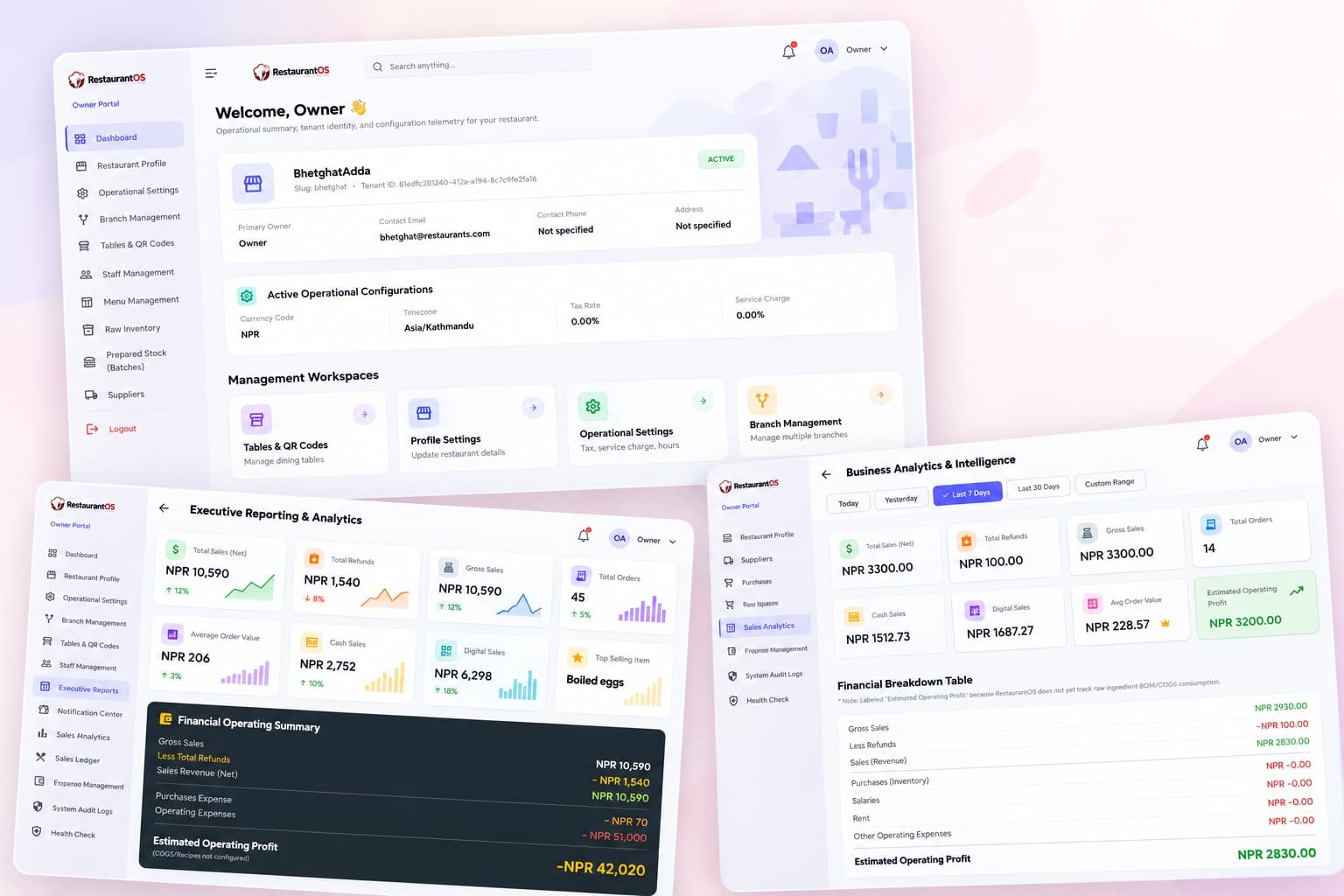
Engineered for the Reality of Restaurant Operations
Running a restaurant involves more than taking orders. Owners need to coordinate staff, manage multiple tables, monitor kitchen progress, maintain stock, record expenses, track purchases, and understand profitability.
RestaurantOS brings these activities together through a centralized management platform. From a customer scanning a table QR code to an order reaching the kitchen, payment being recorded, inventory being managed, and sales appearing in reports, each part of the workflow is connected.
The platform supports role-based access for restaurant owners, managers, cashiers, kitchen staff, and waiters, with dedicated operational interfaces and centralized data management.
The result: less fragmented work, better visibility, more organized service, and informed business decisions.
A Complete Restaurant Management Ecosystem
CORE MODULES & CAPABILITIES
01 — Restaurant Profile & Configuration
Establish your restaurant's identity and configure operational rules: restaurant profile, account status, currency, timezone, tax rates, service charges, registered business name, PAN, and VAT fields.
02 — Branch Management
Manage restaurant locations through a structured branch management system with operating hours, dining areas, branch-specific menus, purchases, expenses, and centralized multi-branch visibility.
03 — Table Management & QR Codes
Digitize the dining experience and simplify customer ordering with table-specific QR codes, seating capacity, real-time availability status, and direct customer phone ordering.
04 — Digital Menu Management
Create and maintain menus (e.g., Breakfast, Fast Food), organize items into categories, manage prices, item images, availability controls, and copy menus across branches.
05 — Order Management & Live Kitchen Workflow
Connect front-of-house with the kitchen through a structured order lifecycle: associate orders with tables/branches, track progress, forward tickets, and manage preparation and readiness.
06 — Kitchen Display System (KDS)
Dedicated workflow for kitchen teams to view incoming tickets, track preparation status, coordinate order handoff with service staff, and eliminate verbal miscommunication.
07 — Point of Sale, Billing & Payments
Manage restaurant sales, review order totals, settle table bills, record cash and digital payment methods, track sales by type, and maintain transaction reconciliation history.
08 — Raw Inventory Management
Maintain real-time visibility into raw ingredients and supplies used by your restaurant, tracking stock quantities and supporting stock control alongside purchasing and operations.
09 — Prepared Stock & Batch Management
Manage prepared food stock and batch-based inventory workflows, organizing ready-to-use and pre-prepared items into monitored batches.
10 — Supplier Management
Maintain an organized supplier directory recording supplier names, contact persons, phone numbers, and address details for streamlined purchasing.
11 — Purchasing & Invoices
Record purchases against suppliers, maintain dates, invoice references, items, and totals, review invoices, export records to Excel, and connect with financial reporting.
12 — Expense Management
Record business expenses, organize custom expense categories, track recurring monthly overheads, filter spending by branch, and export data to Excel.
13 — Sales Analytics & Business Intelligence
Understand sales performance across timeframes (today, yesterday, last 7/30 days, custom date ranges), tracking gross/net sales, refunds, average order value, top-selling items, and operating costs.
14 — Executive Reporting & Analytics
Access management-oriented performance views with sales summaries, total orders, cash vs. digital breakdowns, top items, daily metrics, and exportable financial reports.
15 — Owner Sales Ledger
Maintain a detailed, reviewable record of all sales transactions browsable by date/time, branch, table, staff, items, payment methods, duration, and Excel data export.
16 — Staff Management & Access Control
Organize your team and assign role-based access for Managers, Cashiers, Kitchen Staff, and Waiters with branch association, account activation, and role-specific permissions.
17 — Notification Center
Centralized hub providing operational notifications, kitchen alerts, order milestones, and system updates directly within the application interface.
18 — System Audit Logs
Maintain complete operational accountability by logging order creation, status changes, kitchen forwarding, payment settlement, associated users, roles, branches, and timestamps.
19 — System Health & Connectivity
Check real-time application communication with the backend: ping health endpoints, monitor service latency, view timestamps, and confirm system-wide operational connectivity.
From Customer Order to Business Insight
An integrated, connected operating cycle linking the front of house with the kitchen and executive back-office.
Configure
Set up your restaurant profile, branches, dining areas, tables, staff accounts, and operational settings.
Publish
Organize menus, food categories, pricing rules, images, and live item availability.
Order
Let customers scan table QR codes from their phones or let authorized staff enter orders.
Prepare
Send orders instantly into the kitchen workflow, monitoring preparation tickets in real time.
Serve & Settle
Complete table service, record payments (cash or digital), and print itemized bills and receipts.
Manage Stock
Maintain raw inventory, prepared food batches, supplier directories, and purchasing invoices.
Track Costs
Record daily business expenses, categorize overheads, and organize branch-level spending.
Analyze
Review gross/net sales, payment methods, top-selling dishes, order history, and executive reports.
Owner Control Center
Your Restaurant at a Glance — The RestaurantOS Owner Portal brings important management functions into one unified command center.
Restaurant Identity
View restaurant status, contact information, and multi-tenant account details.
Operational Configuration
Review currency, timezone, tax rates, PAN/VAT fields, and service charge settings.
Branch Oversight
Manage authorized restaurant locations, dining zones, and branch-specific operations.
Service Management
Configure dining tables, QR codes, digital menus, categories, and staff rosters.
Stock & Procurement
Maintain raw ingredient inventory, prepared stock batches, suppliers, and purchase invoices.
Financial Visibility
Review operating expenses, date-based sales ledgers, business intelligence, and executive analytics.
Operational Accountability
Inspect comprehensive audit event logs and check real-time backend health latency.
For owners operating more than one location, centralized access can help reduce the need to manage every branch as an entirely separate operation.
Who is RestaurantOS For?
Designed for Real-World Hospitality Businesses
Restaurants & Dining Establishments
Connect table management, customer ordering, kitchen coordination, billing, and reporting in one unified operating environment.
Cafés & Quick-Service Restaurants
Organize fast-moving menus, takeaway workflows, stock records, and daily counter sales.
Growing Restaurant Businesses
Build a more consistent operational process as staffing, inventory, and management needs scale.
Multi-Branch Restaurant Owners
Gain a centralized view of authorized branches, their individual operations, and consolidated financial performance.
Restaurant Managers & Operations Teams
Reduce fragmented recordkeeping and give teams dedicated, role-tailored workflows for their responsibilities.
Architecture Highlights
A Deployment Model That Fits Your Business
RestaurantOS can be offered through different commercial and deployment arrangements, depending on business scale and infrastructure requirements.
Monthly Subscription
A recurring monthly option for businesses that prefer ongoing service payments with zero large initial capital outlay.
Annual Subscription
An annual option for businesses that prefer predictable yearly billing with discounted operational rates.
One-Time Investment
A permanent purchase model available for eligible on-premise or local-network deployment arrangements.
Custom or Multi-Branch
Tailored infrastructure planning for enterprise hospitality groups with specific multi-tenant or server requirements.
Availability, included services, hosting, updates, support, and branch entitlements depend on the selected package and agreement.
One Platform. Every Operation. Complete Visibility.
RestaurantOS is designed to help restaurant owners spend less time coordinating disconnected processes and more time improving service, controlling operations, and growing their business.
Ready to Modernize Your Restaurant?
Explore how RestaurantOS can fit your restaurant's workflow, infrastructure, and growth plans. Connect directly with our solutions team to schedule a live product demonstration or discuss bespoke deployment.
RestaurantOS by Twin.Tech — Smarter operations. Better visibility. One connected restaurant.
© 2026 Twin Tech. All Rights Reserved.
All product concepts, system architecture, operational methodologies, UI/UX workflows, functional specifications, and trade designs demonstrated within RestaurantOS are the exclusive intellectual property of Twin Tech. Strict copyright laws apply. Unauthorized copying, imitation, reproduction, commercial exploitation, redistribution, or reverse engineering of these proprietary ideas and software mechanisms is strictly prohibited and protected by law.